Tuesday, November 29, 2011

Genome Structural Variation on simulated genome

Here's a brief memo to simulate a read alignment (and indels) based on a human genome chromosome and detect Structural Variations.


Step 1 - Get a reference genome
I chose to get the human reference genome v37 from 1000 Genomes Project: download link to human_g1k_v37.fasta.gz file (851MB).

You can extract the chromosome of your choice (to avoid working on the whole genome) with samtools:

samtools faidx human_g1k_v37.fasta 20 > human_g1k_v37_chr20.fasta

Step 2 - Simulate reads and indels
There are several short reads simulators (e.g. SimSeq, FluxSimulator). Here we are going to use wgsim that was once included in samtools and later extracted as a standalone project.

Wgsim project homepage: https://github.com/lh3/wgsim

Before running the simulator we need to calculate the number of reads we need. Remember the formula to calculate the coverage:

Coverage = N x L / G
(where N: number of reads - L: read length - G: genome size)

To detect indels we aim to have a "good" coverage of the genome, let's aim to get a coverage around 20. Then, if we produce 70-bp reads on human chromosome 20 (63Mbp long), it is easy with the formula above to find that we need at least 18.000.000 reads to achieve this coverage.

Once installed you run wgsim with the following command to generate the two files of paired reads:

wgsim -N 20000000 -X 0.95 human_g1k_v37_chr20.fasta out.read1.fq out.read2.fq > wgsim.out

Note the use of the -X option to increase the probability to extend an indel. The file wgsim.out will contain the indels generated where the column 1 is the chromosome, column 2 is the position, column 3 is the original base, column 4 is the new base (following the IUPAC codes) and column 5 is genomic copy/haplotype. The files out.read1.fq and out.read2.fq will contains the two reads of the paired reads (remember we are working with PEM here).

Step 3 - create the alignment file
With the paired reads files created in previous files we can align these reads against the reference genome and create an alignment file.

Again here, several tools are available and we will use bowtie2.

First, call bowtie-build to index our reference genome

bowtie2-build human_g1k_v37_chr20.fasta homo_chr20


Then the call to actually create the alignment:

bowtie2 -t homo_chr20 -X 700 -1 out.read1.fq -2 out.read2.fq -S homo_chr20.sam

Convert the alignment file to a binary alignment file (.SAM -> .BAM), sort and index using samtools:

samtools view -bS homo_chr20.sam > homo_chr20.bam
samtools sort homo_chr20.bam homo_chr20_sorted
samtools index homo_chr20_sorted.bam

Step 4 - detect Structural Variants
The following command calls shows how to detect indels generated in step 1:

dindel --ref human_g1k_v37_chr20.fasta --outputFile 1 --bamFile homo_chr20_sorted.bam --analysis getCIGARindels

python makeWindows.py --inputVarFile 1.variants.txt --windowFilePrefix 2 --numWindowsPerFile 20000

dindel --analysis indels --doDiploid --bamFile homo_chr20_sorted.bam --ref human_g1k_v37_chr20.fasta --varFile 2.1.txt --libFile 1.libraries.txt --outputFile 3 > 3.out 2> 3.err

echo 3.glf.txt > 3.list

python mergeOutputDiploid.py -i 3.list -o 4.vcf -r human_g1k_v37_chr20.fasta


Sunday, April 17, 2011

Using XSL to filter biomedical data

This post gives a short introduction to XSLT (for Extended Stylesheet Language Transformation) that will be used to transform an XML file into something else. This something else could be another XML file with a different structure, a CSV file or any other text content.

This is a very tiny tutorial intended to help you in setting your environment and doing a first transformation using biomedical data, so I won't go into details of the language nor try to provide an exhaustive list of available operations, there is already plenty of good literature and reference on this subject (see last paragraph "Further reading").

I used this technology some years ago to dynamically transform a stream of data into either a HTML page or a WAP page (for mobile phone internet browser) depending on the client being detected. But here we are going to use XSL for handling and transforming a XML document resulting from a search in UniProt (list of proteins).

Objective: let's say we want to transform the XML document downloaded from UnitProt into a nicer CSV file with two columns: the protein name and the gene name.

You will see that the corresponding filter could be easily adapted to your needs or to any other biomedical source of data (MeSH, Drugbank, etc.).

Requirements/Environment
In order to run XSL in your computer you need the following software installed and properly configured:
  • Java 1.6 or higher
  • Download and install xalan-j_2_7_1-bin
  • once you have Xalan installed, define the environment variable XALAN_HOME that will point to Xalan root folder (e.g. XALAN_HOME=C:\java\xalan-j_2_7_1)
  • update your Java classpath, it should at least include:

    CLASSPATH=%XALAN_HOME%\xalan.jar;%XALAN_HOME%\xalan.jar;%XALAN_HOME%\serializer.jar;%XALAN_HOME%\xml-apis.jar;%XALAN_HOME%\xercesImpl.jar
Input data
We will use the XML data produced by UniProtKB when searching for proteins related to organism "Moloney murine leukemia virus". This is random example to demonstrate the technique on a small XML file, but of course the same could be applied on different data.

Follow these steps to get the XML file:
  1. go to http://www.uniprot.org
  2. run a search using the query:
    organism:"Moloney murine leukemia virus"
  3. in the search result page click the Download link
  4. download the file "Complete Data in XML format" and save it using the filename uniprot.xml
So we have a XML file to play with. You may open it in a text editor to understand the structure of the XML content before doing the XSL script. Note that Uniprot returned around 22 proteins, so you should find in the XML file 22 <entry/> blocks

Write your XSL script
We will write a simple XSL script that will output 2 columns of data: a column with the "Protein fullname" and a column with the "Gene name". Both columns will be separated with a TAB character.

Open a text editor and create a file uniprot.xsl.

A XSL script is itself an XML file! So it should logically start by the header:

<?xml version="1.0" encoding="ISO-8859-1"?>

Then the whole XML document should be written between the "stylesheet" tag:
<xsl:stylesheet version="1.0" xmlns:xsl="http://www.w3.org/1999/XSL/Transform">
...
</xsl:stylesheet>

The next line will say to the XSL interpreter to match the root of the XML document:

<xsl:template match="/">

Then this prints the column header of our CSV file (a TAB between two headers and a line feed character at the end):

<!-- Print columns headers -->
<xsl:text>Accession</xsl:text>
<xsl:text>&#x9;</xsl:text>
<xsl:text>Gene name</xsl:text>
<xsl:text>&#10;</xsl:text>

The following block is a bit more sophisticated. It is a loop on each "entry" tag of your XML file. For each entry it will print the full name of the protein (follow the XML path), and the gene name:

<xsl:for-each select="uniprot/entry">
<xsl:value-of select="accession"/>
<xsl:text>&#x9;</xsl:text>
<xsl:value-of select="gene/name"/>
<xsl:text>&#x9;</xsl:text>
<xsl:text>&#10;</xsl:text>
</xsl:for-each>

For your convenience here is the complete XSL file content:

<?xml version="1.0" encoding="ISO-8859-1"?>
<xsl:stylesheet version="1.0" xmlns:xsl="http://www.w3.org/1999/XSL/Transform">
<xsl:template match="/">
<!-- Print columns headers -->
<xsl:text>Accession</xsl:text>
<xsl:text>&#x9;</xsl:text>
<xsl:text>Gene name</xsl:text>
<xsl:text>&#10;</xsl:text>
<xsl:for-each select="uniprot/entry">
<xsl:value-of select="accession"/>
<xsl:text>&#x9;</xsl:text>
<xsl:value-of select="gene/name"/>
<xsl:text>&#x9;</xsl:text>
<xsl:text>&#10;</xsl:text>
</xsl:for-each>
</xsl:template>
</xsl:stylesheet>


Run your XSL script
Once you have your input XML and your XSL written, you are ready to try it. The following will parse the input XML file and output the desired data defined previously in CSV file that you may us in Excel:

java org.apache.xalan.xslt.Process -IN uniprot.xml -XSL uniprot.xsl -OUT uniprot.csv


Tip: remember that if you manipulate large XML file, your Java runtime may complain about the heap space. You can increase the heap space by adding the parameter -Xms to the java command line.

Further reading:

Saturday, April 16, 2011

Development of Drugs in Public-Private Partnerships environments

This week we organized a debate about the Development of Drugs in Public-Private Partnerships (PPP) environments. It raised some passionate interventions by the participants.

Here are the slides we used to introduce this subject. We are using Orphan Diseases as a potential field where PPP could be fruitful and we present the project Grants4Targets as an example of PPP.

If you are looking for data for your market research on drug development I suggest you have a look to the References slide (slide #18), it contains interesting materials.

Saturday, March 26, 2011

Recommended book

I have recently read "Molecular Modeling: Basic Principles and Applications". It gives a very good introduction for Structural Bioinformatics and also some bits of information for Molecular Simulation. It is a small, light and clearly written book.


The new chapter "Chemogenomic Approaches to Rational Drug Design" has been added to the third edition (I have actually read the second one).

Table of contents:
  1. Introduction.
  2. Small Molecules.
  3. A Case Study for Small Molecule Modeling: Dopamine D3 Receptor Antagonists.
  4. Introduction to Comparative Protein Modeling.
  5. Virtual Screening and Docking.
  6. Scope and Limits of Molecular Docking.
  7. Chemogenomic Approaches to Rational Drug Design.
  8. A Case Study for Protein Modeling: the Nuclear Hormone Receptor CAR as an example for Comparative Modeling and the Analysis of Protein-Ligand Complexes.


Friday, March 25, 2011

Structural introduction to HLA/MHC

An introduction to HLA protein group giving some nice pictures on structures of HLA/MHC.


Here are some pictures from the slideset:

View of a peptide binding site of MHC Class-I (HLA-B27, PDB: 1HSA)

MHC HLA-A2 (in blue) bound to TCR (in red)


Thursday, March 10, 2011

Visit of Parc Cientific Barcelona

Today, I had the great opportunity to visit Parc Cientific Barcelona. A great cocktail of biomedicine labs and companies. It shows Catalunya is investing hard in the sector.

The labs are cleaned, well organized and equiped with brand new equipments.

Some pictures of the "tour" here...

In the basement, some zebra fishes waiting for being fished by lab technicians (there were also a bunch of frogs behind :->):


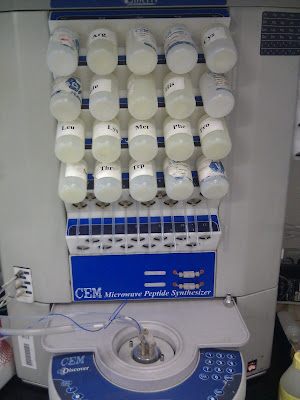
a peptide synthetizer (?):

An old "electron microscope" was waiting for its turn to go to museum:

Thursday, March 3, 2011

Fixing errors in a model

Here is an interesting exercice (and solution) we did today in Structural Bioinformatics class.

The goal is to fix an error in the following model:


Did you see this loop in the middle of the alpha-helix ?!

Before fixing it, these are Prosa plots of this model which confirm the error:
So here are the steps we followed to fix it. There are also interesting tricks to know to manipulate the data.

Getting the Amino Acids sequence

In order to get the corresponding AA sequence out of the PDB file, we simply splitted the PDB using our local tool which also generates the FASTA file out of PDB:

PDBtoSplitChain.pl -i wrong-model.pdb

You may also use this public tool: Make sequence file from PDB file

Prepare the alignment for modeler

Then we produced an alignment between our target sequence against itself:

cat wrong-model.fa > homologs.fa
cat wrong-model.fa >> homologs.fa

Edit the homologs.fa file and name the first sequence "seq" and the second "model".

Create a clustal alignment with homologs.fa

clustalw homologs.fa

We have to locate the error (the loop of the alpha helix) in this alignment. For that purpose, we used Jmol and doing clicks on the AA of the loop we found the sequence Serine->Serine->Valine->Glutamic->Glutamic->Leucine->Leucine or ...SSVEELL...

We edit the alignment file and shift this subsequence to the right:

seq [...]QVAKSSVEELLLSQNSVKSL
model [...]QVAKSSVEELLLSQNSVKSL

Becomes:

seq [...]QVAKSSVEELLLSQNSVKSL-------
model [...]QVAK-------SSVEELLLSQNSVKSL


With this alignment we can produce a new model.

Generate a better model

Based on the alignment modified in previous section, we are going to produce a model and assess whether we improve it or not.

Convert the Clustal alignment file into a PIR file.

For that purpose you may try the online tool: Sequence Format Converter.

With the alignment in PIR format ready prepare the Modeler script:

from modeller import * # Load standard Modeller classes
from modeller.automodel import * # Load the automodel class

log.verbose() # request verbose output
env = environ() # create a new MODELLER environment to build this model in

# directories for input atom files
env.io.atom_files_directory = ['.', '../atom_files']

a = automodel(env,
alnfile = 'homologs.ali', # alignment filename
knowns = ('seq'), # codes of the templates
sequence = 'model') # code of the target
a.starting_model= 1 # index of the first model
a.ending_model = 3 # index of the last model
# (determines how many models to calculate)
a.make() # do the actual homology modeling

and create the model:

mod9v7 model-default.py

Assessment of the new model

This is the new model we just produced. Observed that the loop does not appear in the alpha helix:


And indeed this new model gives a much better result in Prosa:

This manual modification of the alignment can be iteratively done to improve even more the model.